AI reel editor · Talking-head video
AI reel editor for raw talking-head takes
EditorOP is an AI reel editor for people who film themselves talking. Upload your raw clips, retakes and all. It keeps your best takes, cuts the pauses and filler words, and adds word-level captions, B-roll and motion graphics, with music if you want it. You review the reel on a browser timeline, change anything, and export a 1080p MP4 with an SRT caption file. Reels run up to 90 seconds.
See plans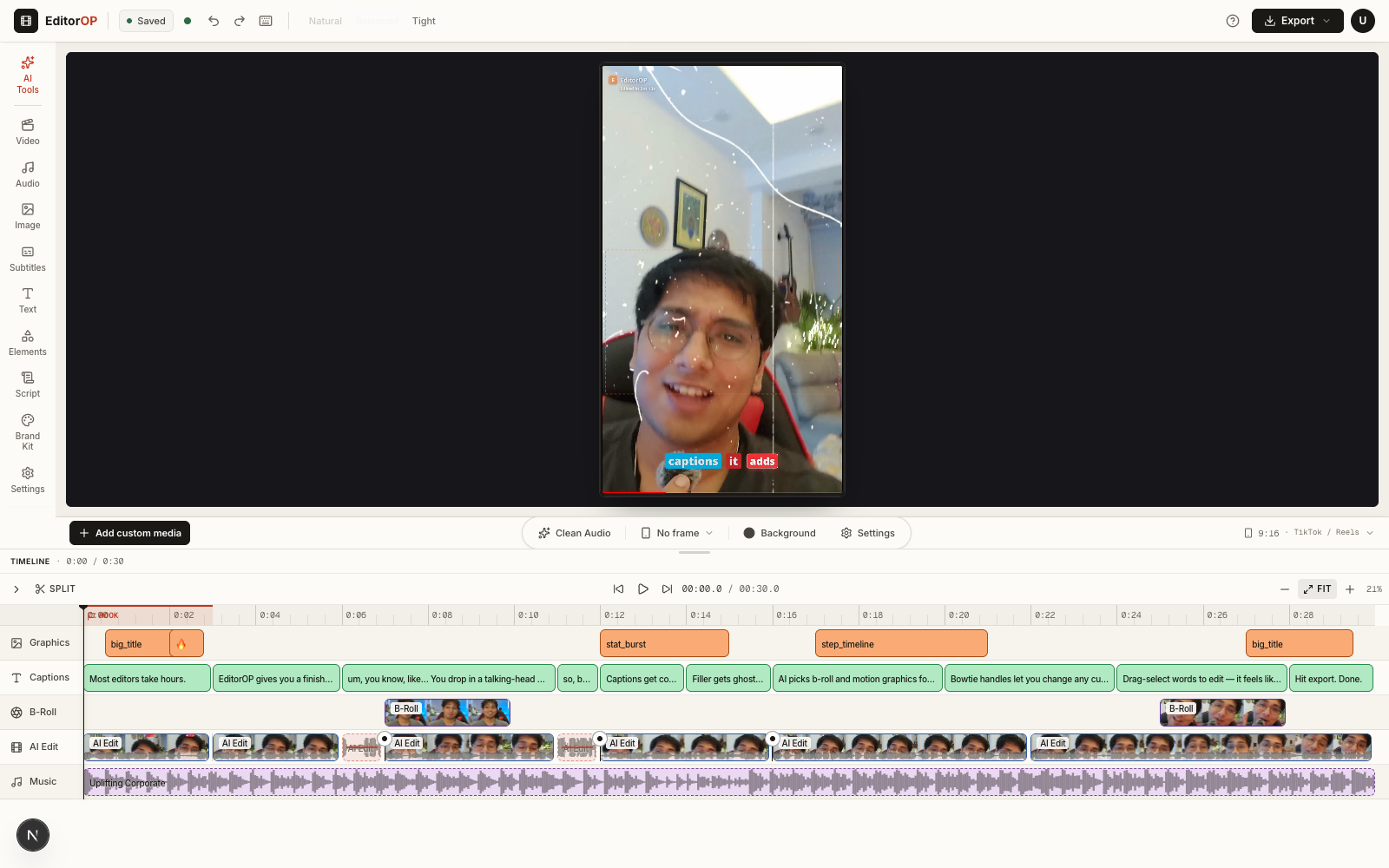
What it is
A reel maker that starts from your raw footage
Most reel makers start from a template or a finished video. EditorOP starts from the messy part: several takes of you talking to camera, with false starts, long pauses and “um”s. It makes the first edit for you, then hands you a real reels editor with every decision on its own track, so you fix what you don’t like instead of starting over.
It makes vertical reels for Instagram Reels, YouTube Shorts and TikTok, up to 90 seconds long, and it runs in your web browser with no app to install.
How it works
How EditorOP edits your reel
Upload your takes
Drop in your raw clips in the order you want them. Pick an intensity: Light trims only the long pauses, Balanced trims pauses and filler words, and Bold cuts tightest and adds more graphics and cutaways. Choose a music mood, or no music.
The cut comes first
EditorOP transcribes what you say, measures the silences and groups repeated takes, keeping the strongest one. These cuts are measured from your audio and words, not guessed. The cut opens for review while the styling finishes.
Check what was cut
Removed pauses, filler words and takes stay on the timeline, marked as cut, and come back with one click. In the Words panel you can cut or restore any word of the transcript.
The look lands
Captions, B-roll, motion graphics and your music arrive on their own tracks. The opening seconds can carry a hook: captions that tuck behind you, or a title card.
Change it, then export
Move, trim, split or delete any piece and undo as you go. Export renders in the cloud as a 1080p H.264 MP4, with an SRT caption file for platforms that accept one.
On the timeline
What you can change before you export
The timeline has six tracks, from the bottom up: music, voiceover, your main video, B-roll, captions and overlays. Every piece the AI placed can be changed or removed.
Takes
Switch to a different take of a line, or restore anything the AI cut.
Captions
One caption style for the whole reel, timed word by word. Fix a misheard name by editing the word.
Hook
Move where the opening ends, and choose captions behind you, a title card or plain captions.
B-roll
Replace a cutaway with another stock clip or one of your own, change its layout, or delete it. How B-roll is chosen
Graphics
Edit the words and numbers, swap the design, retime it or remove it. How graphics are placed
Audio
Change the music track, set how far it ducks under your voice, and add sound effects.
Who it’s for
Who it’s for, and when another tool fits better
A good fit when
- You film yourself talking to camera: founders, coaches, creators and educators.
- You record several takes and don’t want to pick through them by hand.
- You want a finished first edit but the final say on every cut.
- You post Reels, Shorts or TikToks of 90 seconds or less.
Another tool fits better when
- You need clips from a long podcast, webinar or stream. A clipper fits better: see how EditorOP compares with Opus Clip and Klap.
- You want to build the edit yourself with effects and filters. A hands-on editor such as CapCut suits that.
- You want to edit a long video by changing its transcript. Descript is built for that.
- You want to edit in a phone app. Captions has one; EditorOP runs in your browser.
- You need videos longer than 90 seconds, or 4K export. EditorOP makes neither.
FAQ
Questions
What is an AI reel editor?
An AI reel editor makes the editing decisions for a short vertical video: which takes to keep, where to cut, and what captions, B-roll and graphics to add. EditorOP does this from raw talking-head clips and leaves every decision on a timeline you can change before you export.
Can EditorOP make one reel from several takes?
Yes. Upload all your takes. EditorOP groups the repeated lines, keeps the strongest take and cuts the pauses and filler words. The other takes stay on the timeline, so you can switch to one you prefer.
How long can a reel be?
Up to 90 seconds. EditorOP exports vertical reels as a 1080p H.264 MP4 with an SRT caption file. It does not make long-form videos or export 4K.
Do I have to keep the AI’s edit?
No. The AI makes the first edit and you make the final one. Restore any cut, switch takes, fix a caption word, replace B-roll or delete a graphic on the timeline. Nothing exports until you press Export.
How much does EditorOP cost?
EditorOP runs on paid monthly plans that you can cancel anytime, with no free plan. The plans page lists current prices and what each plan includes.
Also in EditorOP
The rest of the edit
- AI B-roll generatorEditorOP reads what you say and places matching B-roll in your talking-head video: your own clips first, then stock footage. Swap, reframe or remove any shot.Read more
- AI motion graphicsStat callouts, charts, maps and name cards timed to the words you say in a talking-head reel. Built from your words and editable on the timeline before export.Read more
Monthly plans
Upload the takes. Review the reel.
Pick a monthly plan, upload your raw clips and check the AI’s first edit on the timeline before you export.